


Saturn Calendar
4.3767.00 Reviews
App Specs
- Version
- 3.41.01.1586
- Updated On
- License
- Free
- Downloads
- 500,000+
- Developer
- Saturn Technologies Inc.
- Categories
- Productivity
- Platform
- Android
Screenshots
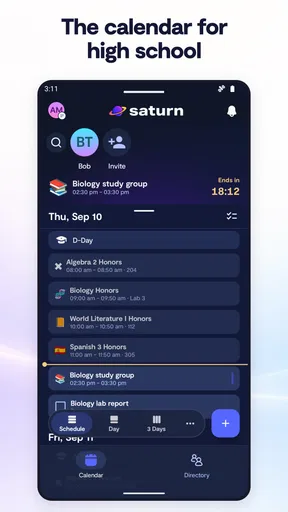
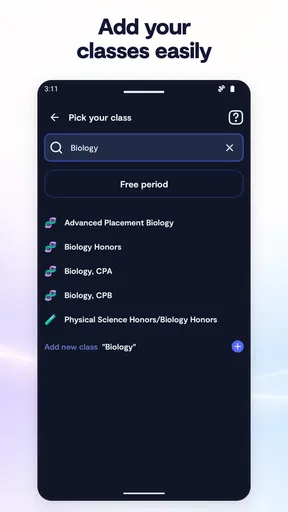
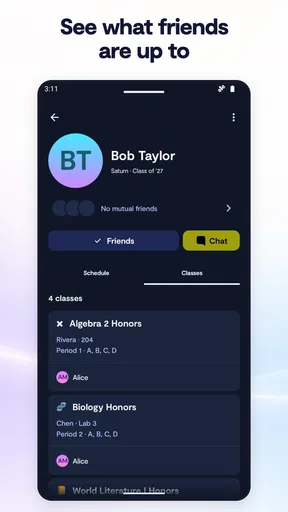
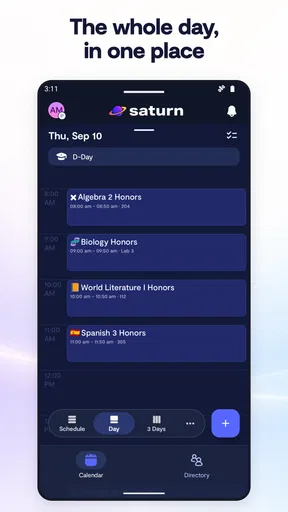
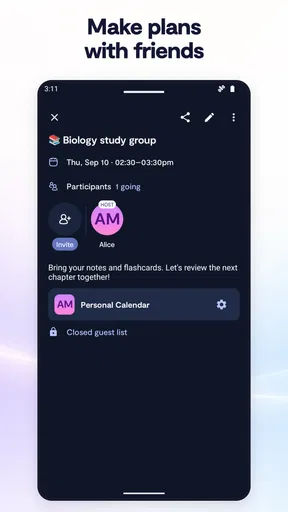
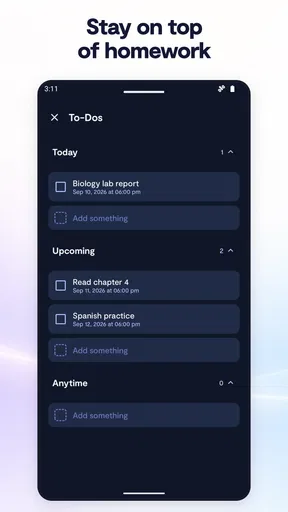
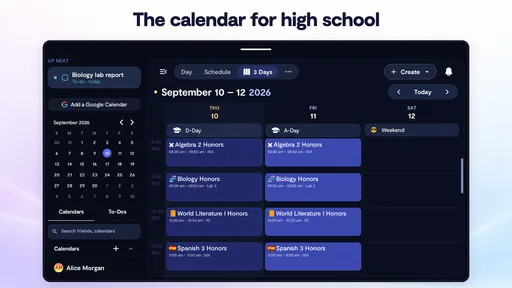
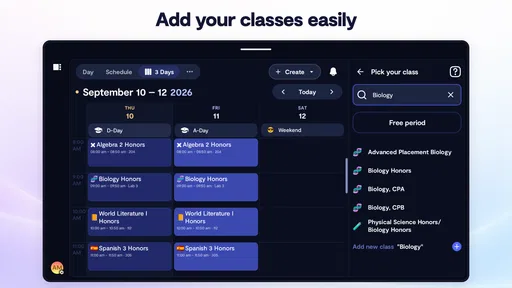
 Analysis by AppCompare
I first approached Saturn Calendar as a scheduling tool for students and friends, but its appeal became clearer after using it as a shared view of everyday life rather than just a place to store appointments. The app sits in the productivity category, comes from Saturn Technologies Inc., and is free to use. Its central idea is straightforward: make schedules, events, and social plans easier to see together.
That combination gives it a different feel from a traditional calendar. A standard calendar often starts with work meetings, appointments, and reminders. Saturn Calendar feels more useful when the question is, “When are we all free?” rather than simply, “What do I have next?” I found that distinction important because it changes how I plan. Instead of checking several conversations and then opening a calendar, I can treat the schedule as the starting point for deciding when to meet, study, or make plans.
The app is available for everyone and has built a sizeable audience, with more than 500 thousand installs and an average rating of 4.3 from roughly 4.5 thousand ratings. Those figures do not replace personal testing, but they do suggest that the basic approach has found a real audience. The current release is version 3.40.00.1487, and it requires Android 10 or later, so compatibility is worth checking before installing it on an older phone.
How Saturn Calendar feels when plans depend on a connection
I find the connection question matters most when a plan changes at the last minute: a shared schedule is useful only when everyone is working from the same current picture. In this section, I’ll look at how I’d keep a plan dependable when access is patchy, including what to check before heading out and when a quick direct confirmation is the wiser handoff.
Shared planning works best when the app can stay connected
The most important thing to understand is that the social side of this calendar is closely tied to connectivity. When I am checking a schedule, coordinating with friends, or looking for a suitable time, the experience makes the most sense with an active connection available. That is not merely a technical detail. A shared calendar is useful because it reflects current information, and current information depends on updates being able to move between people and the service.
In a typical situation, I might be deciding whether to meet someone after school or work. I want to see the relevant commitments, compare availability, and settle on a time without sending a chain of messages. With a reliable connection, that process feels natural. The calendar becomes a conversation aid: I can look at the schedule first and then use messaging only for the details that still need discussion.
The trade-off is that this connected workflow is less comfortable in places where reception is weak or data access is restricted. A conventional paper planner or a calendar that I have already memorized does not wait for a network. Saturn Calendar is more valuable when it can show the latest shared context, so I would not treat it as my only emergency reference for a flight, appointment, or other commitment where access may be uncertain.
Worth Reading Before You Choose

EA SPORTS FC Mobile 26 Is a Bigger Football Game, but It Takes Time

Flipboard Shows What News Apps Must Do Beyond the Feed

Switching to Android Auto Means Rethinking Your Driving Routine

Google Calendar Makes a Crowded Week Easier to Manage

Ludo King Makes the Most of the Minutes Between Plans

Baby Panda World Brings Quick Play to Modern Phones, but Its Game Library Feels Busy
The strongest use case is coordinated planning, not isolated note-taking. If you only need a private list of appointments, a basic calendar may feel quicker and less socially oriented. If your day involves changing plans with friends, the connected approach becomes much more compelling.
A realistic day with the app
Imagine a weekday with classes, a part-time shift, and an evening study session. I can use the calendar to understand the shape of the day before agreeing to anything else. A friend who wants to meet does not need a vague answer such as “I think I’m free later.” We can work from the schedule, identify a practical opening, and make a decision with less back-and-forth.
The useful insight here is that the calendar can reduce uncertainty before a conversation begins. It does not eliminate the need to communicate, because people still need to agree on a place and confirm that a plan matters. What it can do is remove the repetitive part of asking when everyone is available. That is a small improvement, but it becomes meaningful when repeated throughout a busy week.
I also found that this kind of planning encourages more realistic commitments. When plans are discussed casually in a chat, it is easy to forget an existing obligation. Seeing the schedule first makes it harder to promise a time that is already occupied. The app therefore works not only as a record of events, but as a way to make social decisions with better timing.
Why the mobile setting matters
Saturn Calendar is designed for the moments when a phone is the most convenient planning device: between activities, while waiting for someone, or during a quick conversation. That makes the mobile format a strength. I do not need to sit at a desk to check whether an idea is practical. A glance at the phone can be enough to move a plan forward.
There is also a behavioral benefit. Because the calendar is available in the same place where many conversations happen, checking availability can become part of the conversation instead of a separate administrative task. I am more likely to verify a time immediately than to promise to check later and forget.
However, mobile convenience can also encourage rushed input. When I am walking between places or trying to answer someone quickly, it is easy to create an event without carefully considering its timing or details. My advice is to pause after adding anything important and review the day around it. The extra moment helps catch conflicts before they become real-world problems.
Using it in changing environments
The app is particularly suitable for people whose schedules shift during the day. Students moving between classes, activities, and social plans may get more value from a schedule that supports quick coordination than from a rigid planner. The same applies to anyone who regularly changes plans with a group and wants a clearer shared picture.
Connectivity affects this advantage in practical ways. In a strong-signal environment, the phone is a useful planning surface. In a basement, crowded venue, underground journey, or area with inconsistent reception, I would avoid relying on a last-second refresh for a critical detail. A sensible habit is to check important plans before entering a place where access may be unreliable.
That habit also answers an important question for prospective users: can this replace every other planning method? In my view, no. It can be the main tool for connected scheduling, but I would still keep essential times in a form I can recall or access through another dependable method when travel or poor reception is involved. That is not a criticism unique to this app; it is a consequence of depending on a live digital schedule.
What happens when information does not arrive smoothly
Failure and recovery are where a calendar proves its worth. A missed update, delayed refresh, or interrupted connection can create confusion if I assume that the screen always represents the latest conversation. The safest approach is to treat a newly arranged plan as tentative until everyone has clearly agreed, especially when the timing is close.
When something seems inconsistent, I would first check the connection, reopen the relevant view, and compare the displayed schedule with the last message or agreement. If the plan is important, I would confirm it directly rather than trusting a stale-looking screen. This is a practical recovery workflow, and it prevents a small technical interruption from becoming a missed appointment.
Another useful habit is to avoid making several rapid changes while the connection is unstable. If I repeatedly edit a plan without knowing which update has gone through, I create more uncertainty for myself and for anyone else involved. Waiting for the app to reflect the intended change, then confirming it, is slower but safer.
That limitation may matter to users who expect a calendar to behave like a fully independent notebook. Saturn Calendar is better understood as a connected scheduling environment. Its value comes from current, shared context, and that means a little more care is needed when the connection is interrupted.
Keeping personal data use under control
Data-conscious use does not mean avoiding the app; it means using it deliberately. Since the experience revolves around schedules, events, and friends, I would think carefully about what belongs in a shared planning space. I would keep sensitive details out of event names when a simple label is enough, and I would avoid turning every private obligation into a social scheduling item.
A useful distinction is between information needed to coordinate and information that is merely interesting. “Study session” may be enough for a group plan. A long description containing personal circumstances, private addresses, or unnecessary background adds exposure without improving coordination. Keeping entries concise makes the calendar easier to scan and reduces the amount of personal context attached to routine plans.
I would also review who actually needs to know about an event before sharing it. A close friend may need the time, while a wider group may only need to know whether I am available. This selective approach is especially helpful for people who use the app across several social circles and do not want every part of their week visible to everyone.
The practical advantage of concise entries goes beyond privacy. Short labels are faster to understand on a phone, especially when I am checking a busy day in a hurry. In my experience, a clean schedule is easier to trust because the important information stands out instead of being buried in explanations.
Where it beats ordinary calendar habits
Compared with a basic calendar, Saturn Calendar has a clearer social purpose. A standard calendar is often excellent for personal reminders and formal appointments, but it may leave the coordination work to messaging apps. Here, scheduling and social planning are brought closer together, which can reduce the need to ask everyone the same availability questions.
Compared with a paper planner, the advantage is speed of change. Paper is dependable and private, but moving a group plan around requires manual corrections and separate communication. The app is more convenient when plans are fluid and several people need to stay aligned.
Compared with a chat thread, the calendar offers a more structured view. Messages are good for discussion, but important times can disappear under newer replies. A schedule gives those commitments a clearer home. The trade-off is that a calendar cannot replace conversation when the plan is complicated or emotionally sensitive; it organizes timing, while people still need to explain decisions.
For someone already satisfied with a mature general-purpose calendar and a well-organized messaging routine, the change may not feel necessary. The benefit is strongest for users whose planning is naturally social and whose schedules are frequently compared with friends.
Who should try it, and who should skip it
I would recommend Saturn Calendar to students, friend groups, and people who regularly coordinate activities around changing availability. It is also a good fit for someone who finds ordinary calendars too individual and chat threads too disorganized. The free price makes it easy to test without committing money, and the everyone age rating keeps the intended audience broad.
I would be more cautious about recommending it as the sole tool for formal work scheduling, complex project management, or situations where offline access is essential. People who need extensive task systems, detailed professional calendars, or guaranteed access during travel may prefer a more specialized option. Likewise, someone who wants a completely private planner may find the social focus unnecessary.
The developer’s identity is clear—Saturn Technologies Inc.—and the app has been available since Apr 24, 2024. Its continued development is reflected in the current version, but what matters to me is whether the core workflow matches the user’s habits. A newer release does not automatically make a socially focused calendar right for someone who only records private appointments.
My connectivity verdict
After using it as a planning companion, I see Saturn Calendar as a strong choice for connected, mobile-first scheduling. It is most effective when I am comparing availability, arranging plans with friends, and checking a changing day from my phone. The experience feels purposeful rather than overloaded because the social calendar idea remains at the center.
Its main weakness is also part of its identity: the more I depend on current shared information, the more I need a dependable connection and sensible confirmation habits. I would check important plans before going somewhere with weak reception, keep event details concise, and confirm last-minute changes directly when necessary.
My final recommendation is simple. If your calendar is mainly about coordinating real life with other people, this free productivity app is worth trying. If your priority is private record-keeping, advanced professional scheduling, or dependable access away from a network, a conventional alternative may suit you better. For the right audience, though, Saturn Calendar turns availability into something easier to discuss and act on, which is a genuinely useful improvement over scattered messages and memory.
Pros
- Clean
- minimalist interface makes dates and events easy to scan.
- Supports recurring events for birthdays
- meetings
- and regular reminders.
- Useful calendar views help organize plans across days
- weeks
- or months.
- Event details can include times
- notes
- and reminders in one place.
- Lightweight design feels responsive on most modern Android and iOS devices.
Cons
- Advanced collaboration and team-planning tools may be limited.
- Some useful customization options may require exploring the settings.
- Calendar syncing can depend on permissions and the connected account.
- Users wanting task management may find its planning features too basic.
- Notification behavior may vary with device battery-saving restrictions.
FAQs for Saturn Calendar
What is Saturn Calendar, and what can I use it for?
Saturn Calendar is a social calendar app designed to help students organize classes, assignments, events, and daily plans while staying connected with friends and classmates. Its school-focused layout makes it useful for viewing schedules, sharing activities, and coordinating plans. Before downloading, remember that the available features may depend on your school, region, account type, and the information you choose to add.
Is Saturn Calendar free to download and use?
Saturn Calendar can generally be downloaded without an upfront charge, but users should check the current store listing for the latest pricing details and any optional purchases. Some features, services, or premium functions may not be available to everyone. It is also worth reviewing whether your school or community uses the platform, since the app’s usefulness may be limited if your classmates and schedule are not supported.
Do I need an account or school information to use Saturn Calendar?
You may need to create an account and provide basic information such as your school, grade, classes, or schedule to receive the most relevant experience. Depending on the app’s current requirements, verification may also be necessary. Avoid entering information you are uncomfortable sharing, and review the privacy policy before registering, particularly because the app is aimed largely at students and may involve social interactions.
Can I use Saturn Calendar to communicate or connect with other students?
Yes, Saturn Calendar is built around more than personal scheduling and may include social features that help users discover classmates, share plans, and interact around school activities. These tools can make organizing group work or meeting friends more convenient. However, users should manage privacy settings carefully, avoid sharing sensitive personal details, and use available blocking or reporting tools if an interaction feels inappropriate.
Does Saturn Calendar work on both Android and iPhone, and does it require internet access?
Saturn Calendar is intended for mobile use, but compatibility, supported operating systems, and feature availability can change with app updates. Check the official Google Play or App Store listing before installing to confirm that your device is supported. An internet connection will likely be needed for account access, synchronization, social functions, and updated schedules, while some basic calendar information may remain viewable offline.


